DevOps Proxy Support: The Complete Guide to Secure, Scalable & High-Performance Connectivity
In today’s enterprise environments, network security and controlled internet access are critical for DevOps teams. Many organizations restrict direct outbound traffic, making DevOps proxy support an essential component for smooth and secure operations. Whether you are working with CI/CD pipelines, cloud platforms, or containerized applications, configuring proxy support correctly can significantly improve performance, compliance, and reliability.
EDUCATION
Cloud Devops Proxy Support
5/8/20243 min read

This guide explains everything you need to know about DevOps proxy support, including its importance, configuration, challenges, and best practices.
What is DevOps Proxy Support?
DevOps proxy support refers to the configuration of proxy servers within DevOps tools, pipelines, and infrastructure to manage and route outbound and inbound network traffic securely.
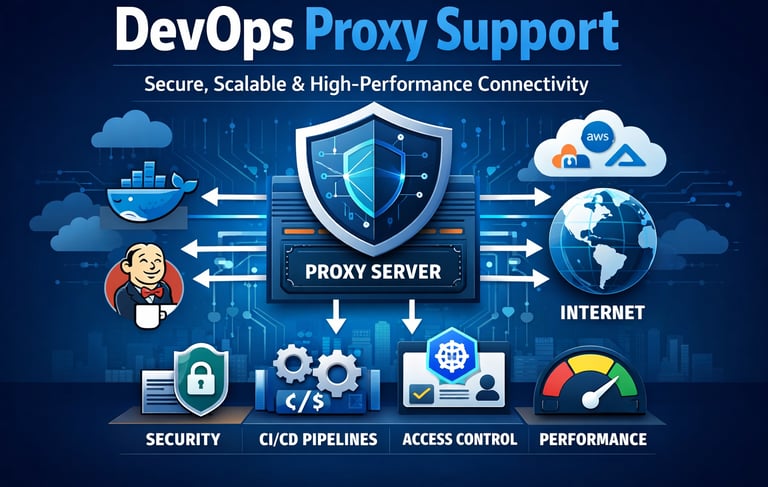
A proxy server acts as an intermediary between your internal systems and external services, such as:
Git repositories
Package managers (npm, Maven, pip)
Cloud services
APIs and third-party tools
Instead of connecting directly to the internet, requests go through a proxy server, which enforces security policies, logging, and access control.
Why Proxy Support is Important in DevOps
1. Enhanced Security
Proxy servers help protect internal systems by masking IP addresses and filtering traffic. This is especially useful in enterprise environments where strict firewall rules are enforced.
2. Compliance & Governance
Organizations must comply with security standards. Proxy configurations allow monitoring and auditing of all outgoing and incoming traffic.
3. Controlled Internet Access
Teams can restrict access to approved domains, preventing unauthorized usage and reducing security risks.
4. Improved Performance
Caching mechanisms in proxies can speed up repeated requests, especially when downloading dependencies.
Types of Proxies Used in DevOps
HTTP/HTTPS Proxy
The most common type, used for web traffic and API communication. It supports secure data transmission via SSL/TLS.
SOCKS Proxy
A lower-level proxy that handles various types of traffic, often used for advanced networking scenarios.
Transparent Proxy
Operates without requiring configuration on client systems, commonly used in corporate environments.
DevOps Tools That Require Proxy Configuration
Many DevOps tools rely on external connectivity and require proxy configuration:
Git (clone, fetch, push operations)
Docker (image pull and push)
Kubernetes (cluster communication)
Jenkins (plugin downloads, builds)
Terraform (provider downloads)
Without proper proxy setup, these tools may fail to connect to external services.
How to Configure Proxy in DevOps Environments
1. Environment Variables
The most common way to configure proxy support is by setting environment variables:
export HTTP_PROXY=http://proxy.example.com:8080
export HTTPS_PROXY=http://proxy.example.com:8080
export NO_PROXY=localhost,127.0.0.1,.internal
These variables ensure that applications route traffic through the proxy.
2. Docker Proxy Configuration
To enable proxy in Docker:
{
"proxies": {
"default": {
"httpProxy": "http://proxy.example.com:8080",
"httpsProxy": "http://proxy.example.com:8080",
"noProxy": "localhost,127.0.0.1"
}
}
}
Restart Docker after applying changes.
3. Git Proxy Setup
git config --global http.proxy http://proxy.example.com:8080
git config --global https.proxy http://proxy.example.com:8080
4. Jenkins Proxy Configuration
In Jenkins:
Go to Manage Jenkins → Manage Plugins → Advanced
Configure proxy settings with authentication if required
Common Challenges in DevOps Proxy Support
Authentication Issues
Some proxies require username and password authentication, which can break automated pipelines if not configured securely.
SSL Inspection Problems
Corporate proxies often inspect SSL traffic, causing certificate errors. You may need to add proxy certificates to trusted stores.
Tool Compatibility
Not all tools support proxy configurations equally, leading to inconsistent behavior.
Performance Bottlenecks
Improperly configured proxies can slow down builds and deployments.
Best Practices for DevOps Proxy Support
1. Use Secure Authentication
Always use encrypted credentials and avoid hardcoding them in scripts.
2. Maintain NO_PROXY List
Exclude internal services (e.g., Kubernetes cluster IPs) to avoid unnecessary routing.
3. Automate Configuration
Use infrastructure-as-code tools to standardize proxy settings across environments.
4. Monitor and Log Traffic
Enable logging to identify issues and improve performance.
5. Regularly Update Certificates
Ensure SSL certificates are valid and trusted across all systems.
DevOps Proxy Support in Cloud Environments
Cloud platforms like AWS, Azure, and Google Cloud often integrate proxy configurations with:
Virtual networks
Security groups
Private endpoints
Using proxies in cloud DevOps ensures secure communication between services while maintaining compliance with organizational policies.
Conclusion
DevOps proxy support is a crucial aspect of modern software delivery, especially in secure and enterprise-grade environments. Proper configuration ensures seamless connectivity, improved security, and optimized performance across tools and pipelines.
By implementing best practices such as environment-based configuration, secure authentication, and monitoring, organizations can overcome common proxy challenges and build resilient DevOps workflows.
If you are preparing for real-world DevOps scenarios or interviews, mastering proxy support concepts will give you a strong advantage in handling enterprise-level infrastructure.
SEO Keywords Included: DevOps proxy support, proxy configuration in DevOps, CI/CD proxy setup, secure DevOps networking, enterprise DevOps proxy